TreeBloom

Software and Media for Education

Concept Map

NEW VERSION 1.0.2

What's New in Concept Map

Welcome to Version 1.0.2! This release introduces major readability enhancements, premium styling configurations, modular codebase architecture, and custom exporter controls.

🎨 Default & New Light Themes

Nordic (Light) is now the default theme. Also introducing two gorgeous new light themes: Cotton Candy & Loose Leaf for personalized mapping styles.

🔧 Modular CSS & Codebase Splits

Decoupled visual layouts into independent modular files, ensuring cleaner codebase architecture and improved app load times.

📐 Outline & Handle Precision

Added custom thickness options for node outlines and perfected handle centering to align wire connections exactly with node borders.

⚙️ Exporter Controls

Introduced a "Preserve Colors" checkbox in the document outline exporters, allowing you to choose whether node colors carry over to exported pages.

👁️ Contrast & Spacing Enhancements

Optimized element padding and increased visual contrast for better accessibility and readability when mapping dense concepts.

🏷️ New App Logo

Featuring a fresh, polished application icon that aligns with our brand design updates.

💡 How to Update: Users will receive this latest version automatically through the standard Microsoft Store Update process.
Previous Releases
Version 1.0.1

This release addressed welcome screen layouts, improved native file pickers, resolved exporter crashes on deep maps, and restored Tauri bridge namespaces.

✨ Welcome Screen

Restructured layout prioritizing Create Blank Canvas and Open Saved Map side-by-side. Added native open file picker bindings and startup checkbox preference.

📄 DOCX Exporter

Resolved outline exporter crashes by clamping maximum nesting depth to 8 levels and resolved border formatting exceptions.

⚡ Tauri Bridge

Restored standard namespaces under Tauri v2 and resolved binary format mismatches during project file loads.

Version 1.0.0

Initial release of Concept Map on the Microsoft Store.
Organize Your Thoughts Visually

Concept Map is an intuitive, local-first application designed to help students, educators, and professionals structure their ideas. Build interconnected nodes, customize relations, and map out complex topics with ease.

Visual Thinking

Create visual diagrams to map out relationships between concepts, making it easier to study, plan, and organize information.

Privacy by Design

Your maps are yours alone. All data remains stored locally on your machine with zero cloud tracking or external data transmission.

Offline First

Work without distractions. Concept Map functions entirely offline, ensuring you can map your ideas anytime, anywhere.

Watch Concept Map in Action

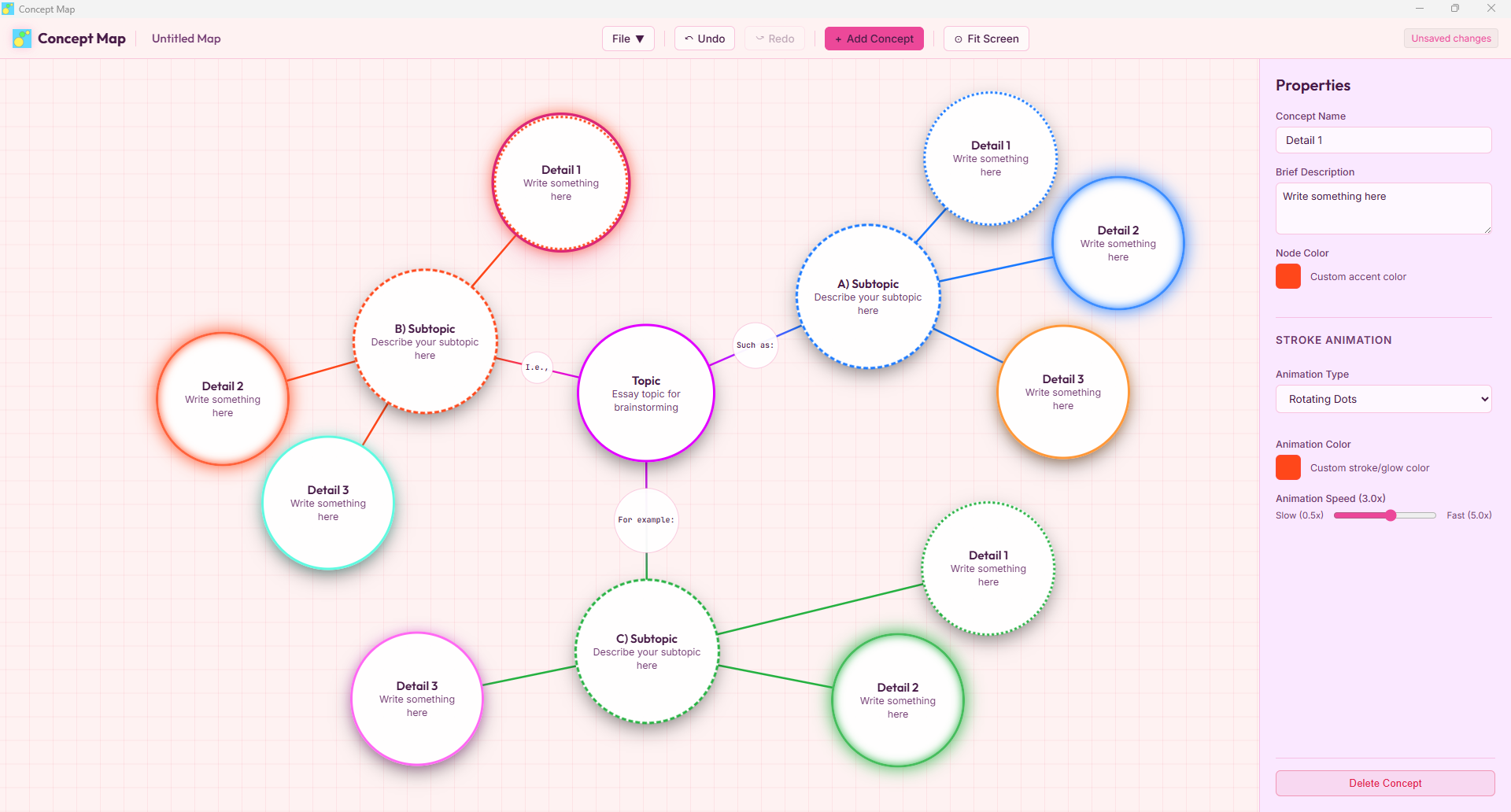
Interface Preview

Concept Map Interface Screenshot